Prospect Research and Call Prep
Walk Into Every Discovery Call Knowing the Pain
Enter a prospect's website. DeepView does the prospect research for you, compares them with up to 4 competitors, and hands you a call plan: likely pain, discovery questions, objections, and who decides. Every fact links to its source.
- No card for the free try
- Public sources only
- Plans from $39 a month
The Problem
The Call Is Won or Lost Before You Dial
Most first calls start cold. The seller skims a homepage, guesses at the pain, and burns ten minutes on questions the website already answered. Then the prospect stalls on budget or "needs to think it over." DeepView fixes the prep, so your discovery time goes to the real pain and the real decision.
Call Prep That Follows Your Process
What You Need Before You Dial
Find the Pain Before Discovery
See the likely pains with the evidence behind each one. Go into discovery with a hunch you can test, not a blank page.
Set the Upfront Contract Before You Dial
Each call plan includes a plan for the first five minutes. Use it to agree on time, agenda, and what happens at the end of the call.
Qualify on Budget and Decision
Know who decides. When budget or decision facts are not public, DeepView lists the gap and the question to ask.
Get Ahead of Objection Handling
See the objections this prospect is likely to raise, with an answer for each, before they come up.
Closing Prep You Can Share
Send the prospect a sourced client report with their scores next to up to 4 competitors and ranked opportunities.
Prospect Research You Can Trust
DeepView keeps a fact only if it matches the source word for word. Anything else is labeled as an assessment.
Less Guessing on the Call. More Time on the Real Pain.
Who It Is For
Walk In With a Call Plan That Matches How You Sell
Sandler Style Trainers and Coaches
Run role plays and call reviews on real companies. Each call plan shows the pain to dig into, the questions to ask, and the upfront contract to set.
10X Style Closers and Sales Coaches
Make more calls without going in blind. Know the prospect, the objections, and who signs before you pick up the phone.
B2B Sales Teams
Give every rep the same call prep, the same discovery questions, and the same plan for the first five minutes.
Agencies, Consultants, and Appointment Setters
Open with real numbers about the prospect's speed, search, and reviews next to their competitors. It is a reason to book the meeting.
DeepView is an independent product. It is not made by, endorsed by, or affiliated with Sandler, 10X, or Grant Cardone. It works with the way their students already sell.
How It Works
From Website to Call Plan in Three Steps
- 1
Enter a Website
Add the prospect's website. Add the contact and what you sell if you want the plan tailored.
- 2
DeepView Does the Research
It reads their site and public sources, keeps only facts it can match to a source, runs speed and search tests, checks reviews, and measures up to 4 competitors the same way.
- 3
Walk In Prepared
Get your private call plan and a client report. Share the report as a link or a PDF.
What You Get
Two Reports From One Website
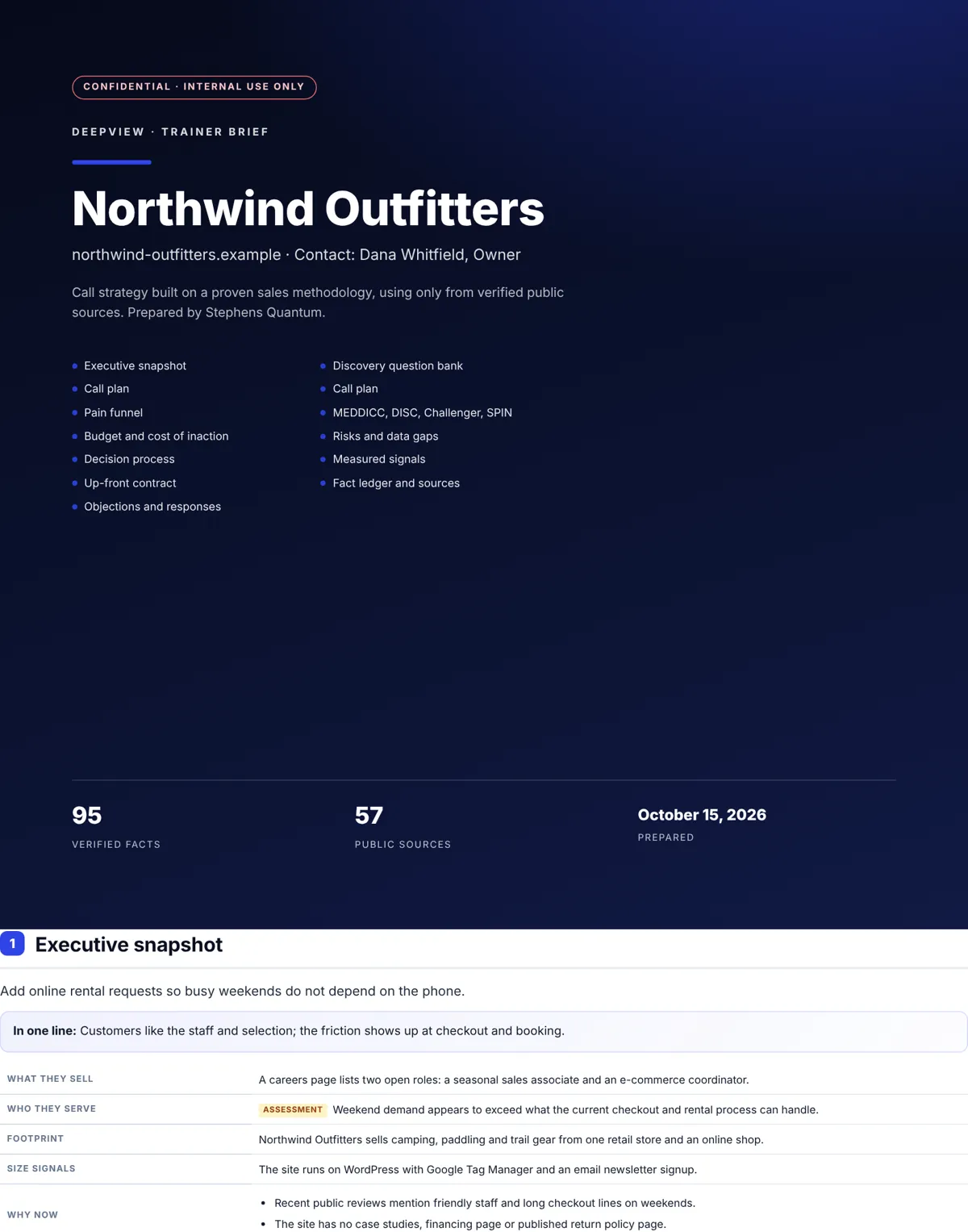
Your Private Call Plan
- Likely pains, with the evidence behind each
- 15 to 20 discovery questions in call order
- Likely objections and answers
- Who decides
- A plan for the first five minutes
- Gaps still to fill, with the question to ask
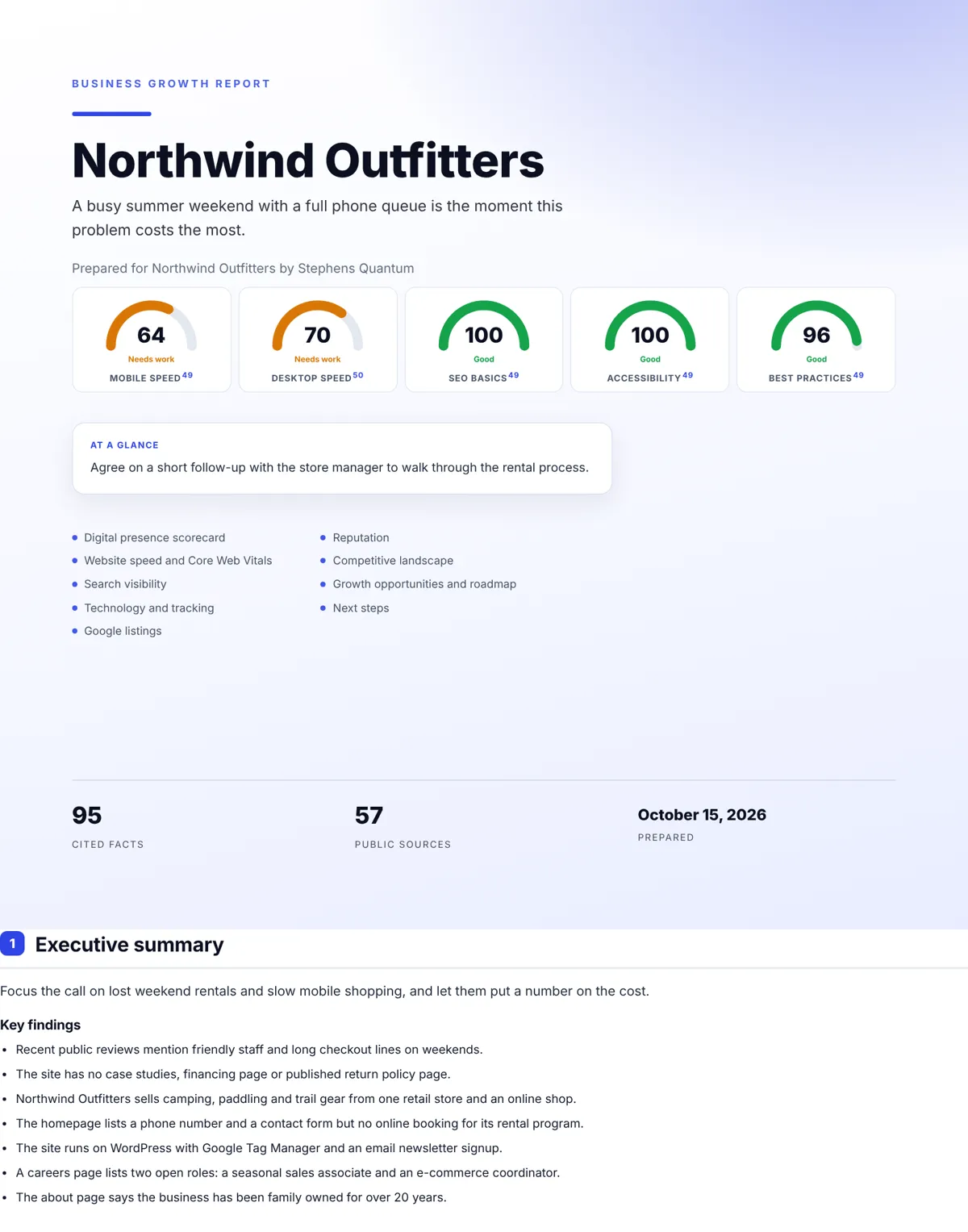
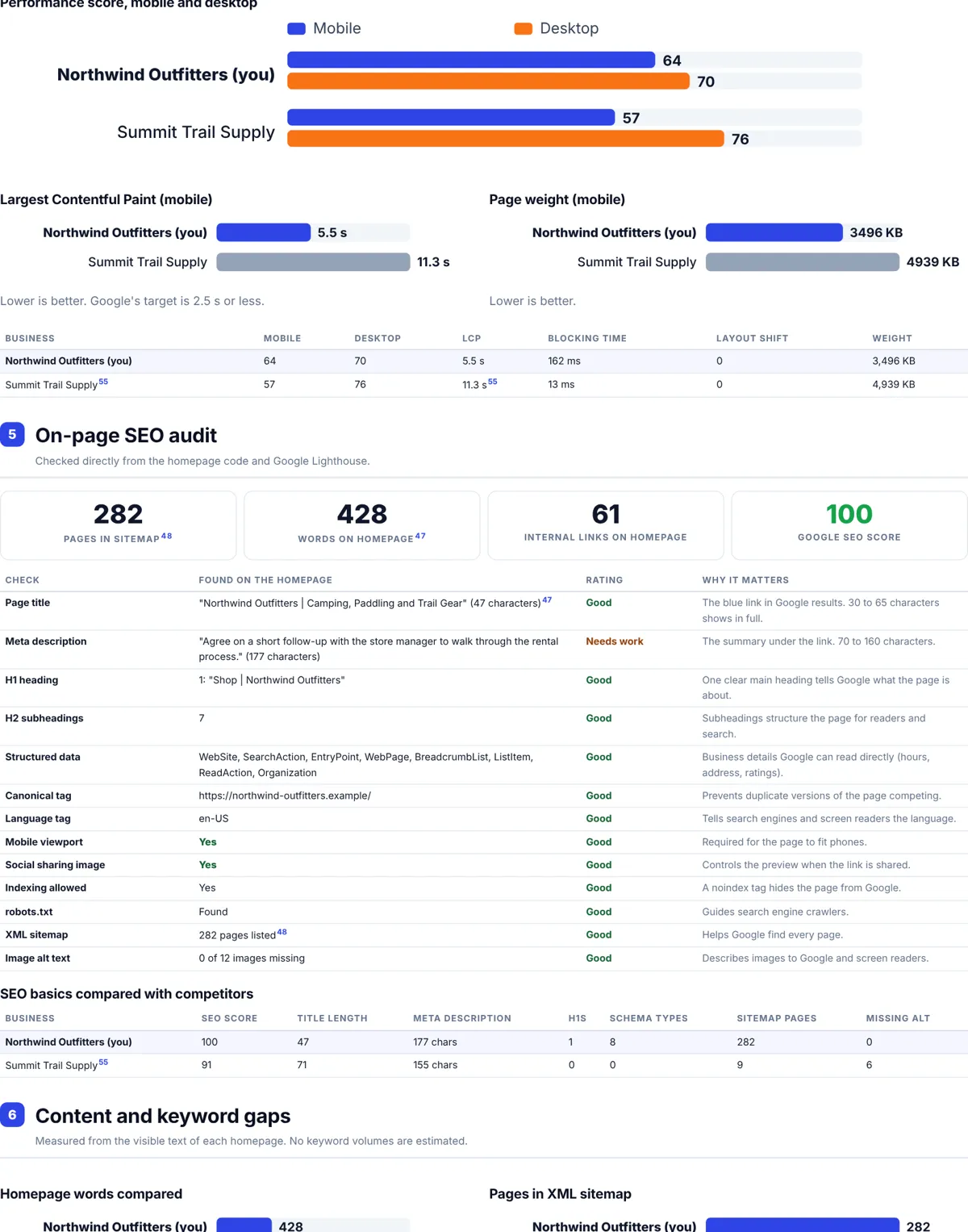
The Client Report
- Speed, search, content, social, tracking and review scores in plain words
- A comparison with up to 4 competitors
- 6 to 8 opportunities ranked by impact and effort
- A 30 day, 90 day and longer roadmap
- No sales notes, so it is safe to share
Sample uses a fictional company. No client data.
Pricing
Simple Plans for Every First Call
Starter
$39 per month
For one seller doing call prep for a few first calls a week.
- 10 reports per month
- 1 seat
- Call plan and client report for every company
- Shareable client links and PDFs
- Small "Made with DeepView" line on client reports
Pro
$99 per month
For a seller or sales coach who preps most discovery calls.
- 40 reports per month
- 3 seats
- White label client reports: your logo, colors and company name
- Everything in Starter
Team
$249 per month
For a sales team or agency that preps every new prospect.
- 120 reports per month, shared by the team
- 10 seats, add more for $20 per seat per month (up to 25)
- Client folders with access per person
- White label
- Everything in Pro
Monthly billing. Upgrade any time and pay only the difference for this month. Downgrades and cancellations take effect at the end of the billing period. Reports reset on your billing date.
Give 20%, Get 20%
Share your account's link. Your friend gets 20% off their first month. When they pay, your account gets 20% off a future bill. Up to 3 credits a year. Referral Terms
Free Try
Try DeepView on One Company
Pick any company, yours or a prospect's. We run the full prospect research and email you the client report. The private call plan comes with a paid plan.
- No card
- One email to confirm it is you
- One free company per person
We check that your details are real so the free try stays one per person. We only contact you by email.
FAQ
Questions About Call Prep and Prospect Research
What Is DeepView?
DeepView is prospect research and sales call prep in one place. Enter a company website. You get a private call plan for your discovery call and a sourced client report you can share.
Does DeepView Work With the Sandler Selling System?
Yes. The call plan lines up with how Sandler sellers run a call. It gives you likely pain with evidence, discovery questions in call order, and the gaps to cover on budget and decision. You use the first five minutes plan to set your upfront contract. DeepView is an independent product. It is not made by, endorsed by, or affiliated with Sandler.
Is DeepView Good for 10X Style Sellers and Closers?
Yes. If you sell with high activity and want to know the prospect before you call, DeepView gives you the facts, the likely objections with answers, and a clear plan for the call. DeepView is an independent product. It is not made by, endorsed by, or affiliated with 10X or Grant Cardone.
How Does DeepView Help With Discovery-Call Planning?
The call plan gives you 15 to 20 discovery questions in call order, the likely pains behind them, and who decides. It also lists what is still unknown, with the question that will fill each gap.
Can It Help With Qualifying on Budget and Decision?
It helps you ask the right questions. Budget and decision facts are rarely public. When DeepView cannot find them, it lists them as gaps and gives you the question to ask, so you qualify on the call instead of guessing.
Does It Help With Objection Handling?
Yes. Each call plan lists the objections this prospect is likely to raise and an answer for each, based on what the research found.
Can I Use It for Appointment Setting?
Yes. Setters and SDRs use the client report as a reason to call. It shows the prospect real numbers about their own business next to their competitors.
What Is the Difference Between the Call Plan and the Client Report?
The call plan is for you only: likely pains with evidence, discovery questions, objections, who decides, and a plan for the first five minutes. The client report is written for the prospect: their measured scores, how they compare with competitors, and ranked opportunities. It has no sales notes in it, so it is safe to share.
Where Does the Information Come From?
Public sources only: the company's own website, public web search results, public review pages, their Google Business Profile, Google PageSpeed tests, and competitors' public websites. DeepView does not use private databases or contact lists.
How Do I Know the Facts Are Right?
DeepView keeps a fact only if it can find the exact quote in the source, and every fact links back to that source. Anything it cannot back up is labeled as an assessment, and missing information is listed as a gap with the question that would fill it.
What Does It Measure?
Mobile and desktop speed, Core Web Vitals and search checks from Google PageSpeed, how many pages their sitemap lists, the tech and tracking tags on their site, their social links, public review ratings, and their Google Business Profile when it matches their website. Up to 4 competitors are measured the same way.
Is There a Free Try?
Yes, one free analysis per person and per company. Enter your details on this page and confirm your email to start it. The free try includes the client report. The private call plan comes with a paid plan.
How Do I Get My Report, and How Long Does the Link Last?
Free try: confirm your email and we email you a link when the report is ready. A free report link works for 30 days. On a paid plan you run reports from your dashboard, share them by link for 1 to 90 days, turn a link off at any time, or download a PDF.
Can I Share the Client Report With the Prospect?
Yes. That is what it is for. Send the link or the PDF.
Who Can See the Call Plan?
Only people on your account. Call plan PDFs are watermarked with the name of the person who downloaded them. Owners and Admins can turn call plan downloads off for Members.
Can My Team Share One Account?
Yes. Pro includes 3 seats and Team includes 10. Everyone has their own login and shares the account's monthly reports. Team can add seats for $20 per month each, up to 25 people.
What Happens to Reports When Someone Leaves?
They stay with your company. Removing a person ends their access right away. Their reports and client folders remain in the account.
Can I Put My Own Brand on the Reports?
On Pro and Team, yes. The client report, the client PDF and the share page show your logo, colors, company name and contact, with no DeepView branding.
Why Do You Ask for a Code on a New Device?
Each person can use DeepView on 2 devices. A one time code sent to your email confirms a new one. This keeps logins from being shared and protects your clients' data.
Can I Change Plans?
Yes, any time in Plan and billing. Upgrades start right away and you pay the prorated difference. Downgrades start at your next billing date.
When Do My Monthly Reports Reset?
On your billing date each month, not on the 1st.
What Happens If I Cancel?
Your plan runs to the end of the paid period. Then the account is view only for 90 days so you can still view and download reports. After that it is deleted.
Can I Delete My Account?
Yes. The Owner can delete it from Team settings. You have 7 days to undo it. After that everything is permanently deleted.
How Does the Referral Program Work?
Share your account's link. Your friend gets 20% off their first month. When they pay, your account gets 20% off a future bill. Up to 3 credits a year.
Is My Data Private?
Yes. Each company account is fully separate. Nobody outside your account can see your reports, folders, brand or team, and client links show only the client report.
Know the Pain Before Your Next Discovery Call
Run one company free. See the sourced client report for yourself.